

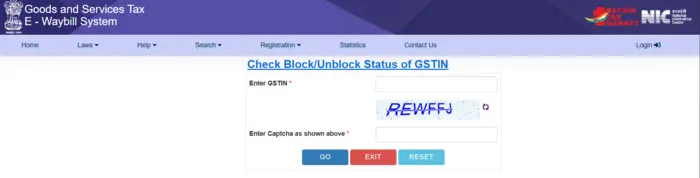
Verifying the Block/Unblock Status of GSTIN is one of the most essential compliance checks for Indian taxpayers, logistics partners, and accounting professionals. A blocked GSTIN — especially on the e-Way Bill System — can immediately halt the generation of e-way bills, disrupting goods movement, deliveries, and overall business operations. Knowing how to check and interpret this status empowers you to act quickly and restore compliance without delays.
Before we jump into the detailed instructions, take note of the most crucial information at a glance.
Key highlights
• Official government tool available for GSTIN block status check
• Link applies specifically to e-Way Bill generation status
• No login or fee required to check status
• Block status often triggered by non-filing of returns
• Update status from GST Portal reflected on e-Way Bill portal
| Description | Details |
|---|---|
| Official Status Check Link | https://ewaybillgst.gov.in/Others/GstnIsBlock.aspx ewaybillgst.gov.in |
| Purpose | Check Block/Unblock Status of GSTIN for e-way bill generation |
| Login Required | No |
| Cost | Free |
| Inputs Required | GSTIN, Captcha |
| Output | GSTIN status (Blocked/Unblocked) |
What Is the Block/Unblock Status of GSTIN
The Block/Unblock Status of GSTIN tells you whether a specific GSTIN is permitted to generate e-way bills on the government portal. The e-Way Bill System is linked to GST return compliance, especially Form GSTR-3B. When a GSTIN is blocked, it means the taxpayer cannot generate e-way bills as either consignor or consignee, affecting logistics and delivery.
In contrast, an unblocked GSTIN indicates that the taxpayer is cleared for e-way bill generation and related downstream activities.
Why GSTIN Gets Blocked
A GSTIN may be blocked for e-way bill generation due to non-compliance with statutory requirements. The most common reasons include:
• Non-filing of GSTR-3B returns for two consecutive tax periods
• Mismatch or unrecorded return filings on the GST Common Portal
• Delays in updating return status between GST and e-Way Bill portals
Under the GST rules, if GSTR-3B remains unfiled for two continuous months or more, the e-Way Bill portal automatically blocks the GSTIN for generating bills until compliance is achieved.
How to Check Block/Unblock Status of GSTIN (Exact Updated Link)
The fastest way to check the block status of a GSTIN for e-way bill generation is via the official status check tool on the e-Way Bill portal.
Step-by-Step Instructions
- Open your web browser and go to:
https://ewaybillgst.gov.in/Others/GstnIsBlock.aspx - Enter your 15-digit GSTIN in the designated field.
- Type the captcha code displayed on the screen.
- Click “Submit”.
The system will respond with the current Block/Unblock Status of GSTIN for e-way bill generation. If the GSTIN is blocked, the portal will clearly show “Blocked” with details.
This public tool does not require login to the e-Way Bill portal — making it quick and accessible to anyone with a GSTIN.
What the Results Mean
• Unblock / Not Blocked: The GSTIN is clear for generating e-way bills.
• Blocked: The GSTIN is restricted from generating e-way bills. This typically requires action.
Why Isn’t My GSTIN Unblocked Yet?
After filing pending returns, the e-Way Bill portal may not immediately reflect the updated status because it relies on synchronization with the GST Common Portal. If your GSTIN remains “Blocked” after filing:
• Use Search → Update Block Status on the e-Way Bill portal.
• Enter your GSTIN and captcha, and click Update Unblock Status from GST Common Portal.
• This refreshes the portal’s return data and typically unblocks the GSTIN within a short period.
If the issue persists, you can reach out to the GST help desk or submit a complaint for technical resolution.
Difference Between GSTIN “Blocked” vs “Cancelled” vs “Suspended”
It is important to distinguish between different statuses that can appear for a GSTIN:
• Blocked: Temporary restriction on e-way bill generation.
• Suspended: A broader compliance restriction, potentially affecting other GST functions.
• Cancelled: GST registration terminated — the GSTIN is no longer valid.
The Block/Unblock Status of GSTIN refers specifically to e-way bill generation and does not mean your GSTIN registration is cancelled. Always verify via the GST portal if you are unsure.
What Happens When GSTIN Is Blocked
Operational Impact
• You cannot generate e-way bills as consignor or consignee.
• Movement of goods under GST becomes difficult, resulting in delays.
• Logistics teams may face compliance notices from transport authorities.
Financial & Compliance Impact
• Non-generation of e-way bills can lead to penalties if goods are transported without them.
• Business deliveries and dispatch cycles may be disrupted.
Reputational Impact
• Customers, vendors, and partners may see blocked status as a warning sign of non-compliance.
How to Unblock Your GSTIN
1. File Pending GST Returns
The most effective way to get unblocked is to file all outstanding returns (especially GSTR-3B) on the GST portal. Once returns are filed:
• The GST portal reflects updated compliance.
• The e-Way Bill portal automatically updates within a short period.
2. Refresh Block Status
If your GSTIN still shows as blocked after filing returns:
• Go to Search → Update Block Status on the e-Way Bill portal.
• Enter the GSTIN and captcha.
• Click Update Unblock Status from GST Common Portal.
• The portal fetches the latest return data and updates the status.
3. Contact Support
If technical issues persist, contact the GST Help Desk or raise a ticket through the GST portal for assistance.
Tips to Prevent Your GSTIN From Being Blocked
• File all GST returns on time (monthly/quarterly as applicable).
• Reconcile your return filings between the GST portal and the e-Way Bill portal.
• Periodically check the status — don’t wait for a notice.
Proactive compliance reduces risk and avoids business disruption.
Common Questions About Checking Block/Unblock Status
Is there any fee to check the status?
No, the Block/Unblock Status of GSTIN can be checked for free using the official e-Way Bill portal.
Can anyone check the status?
Yes, the status check tool does not require login — anyone can verify a GSTIN’s status.
Does blocked mean cancelled?
No — blocked is temporary and specific to e-way bill generation, not cancellation of registration.
Conclusion
The Block/Unblock Status of GSTIN directly affects your ability to generate e-way bills, which in turn impacts goods movement, logistics compliance, and operational continuity. With the official status page at https://ewaybillgst.gov.in/Others/GstnIsBlock.aspx, you can instantly check whether your GSTIN is blocked or unblocked. Remember to file your GST returns timely and use the Update Block Status feature if you have recently complied but still see an outdated status. Regular monitoring and prompt action help ensure uninterrupted compliance and seamless business operations.

1 Comment
Pingback: Goods And Services Tax (GST): The Ultimate Guide To Benefits, Rules, And Compliance | 1stHeadline.Com